 eleanor
After-hours support
After-hours WhatsApp support: who replies at 10 p.m.?
A customer messages after closing time. How do you acknowledge their request, preserve the next step and use AI responsibly without promising a 24/7 human team?

It's 10:07 p.m. Someone messages your business: "Can I book a visit for Saturday?" Your team finished at six. Nobody should have to leave dinner to answer, but the request should not vanish until Monday either. That is the real after-hours problem. It is not just about sending a fast reply. It is about keeping the conversation and its next step intact.
You do not have to choose between total silence and promising round-the-clock human service. A reasonable middle ground is to acknowledge the message, explain your actual hours, save the question and give your team a clear task when work resumes. AI can support that process, but only within the information and decisions you authorize.
An away message does not mean an issue was handled
The WhatsApp Business app includes an away message feature. Meta's official guide to first impressions explains how an away message can reassure people who contact you while the business is closed. It is a useful first response, not evidence that anyone confirmed an appointment or resolved a request.
"We'll get back to you shortly" sounds friendly, but shortly means different things at 10 p.m. on a Friday. Say when the team actually returns. Explain that any availability or commercial terms will be checked first. If you have a genuine emergency channel, identify it accurately rather than attaching an urgent label to every message.
The same caution applies to AI. A model can write a remarkably confident answer without knowing your live calendar, stock or service capacity. The goal is not to make a robot pretend to be an employee awake all night. It is to decide which questions can be answered safely and which need a handoff.
Three types of message deserve different handling
One rule for every after-hours conversation is usually too blunt. Start with three categories and write down what can happen in each:
- Verified information. Office hours, business location and established instructions can be provided from an up-to-date knowledge base. An authorized AI agent may answer these straightforward questions.
- Requests requiring confirmation. Available appointments, quotes, stock or delivery schedules depend on current facts. AI can summarize the request and prepare a draft, but must not promise a slot that nobody has checked.
- Sensitive or urgent situations. Complaints, personal information, health-related matters and disputed payments may need specific policies or a human specialist. An automated message can point to the appropriate next channel without claiming the matter is settled.
The distinction works whether your business is a clinic, repair company or retailer. The categories remain useful, while the permitted answers and handoff policies change with the operation.
Keep the promise when the next shift takes over
Consider the message "Could you check whether tomorrow works?" If the dashboard shows only a green "replied" status, the morning team still has no idea what to check. A useful record includes the customer's request, who owns it, which details remain unverified and the next action with a time.
A concise note might read: "Asked about Saturday; availability unconfirmed; schedule team checks at nine; reply in the original thread." That note is not glamorous, but it prevents one of the most familiar support failures: a business asking the customer to repeat a story they have already told.
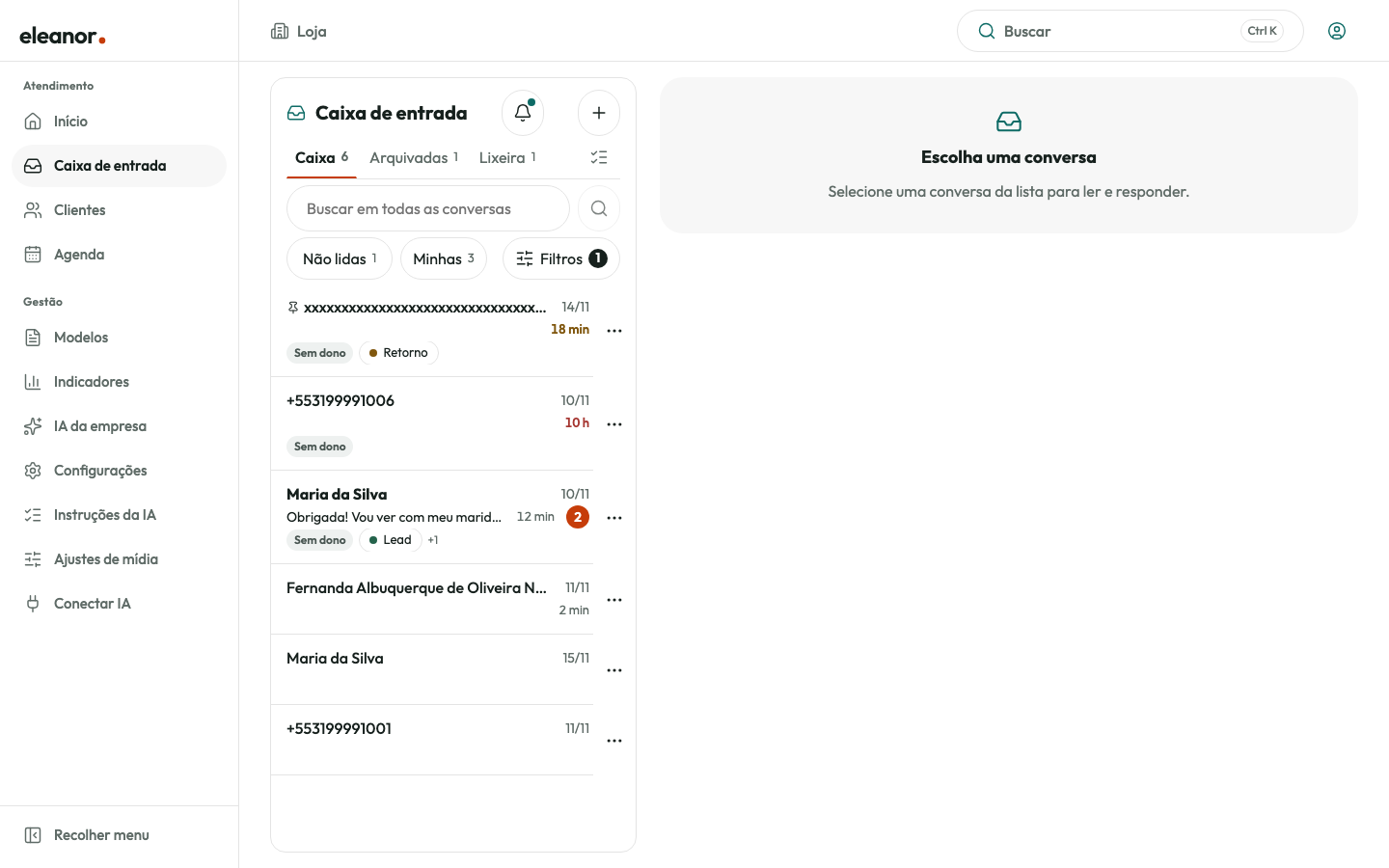
Eleanor's shared inbox and customer record bring that context together. The team can see the conversation history and who is responsible. Depending on the plan and approved rules, AI can draft a response or handle a permitted topic automatically. Those are different capabilities. A plan with AI drafting does not necessarily include autonomous replies, and neither removes the need for accurate business information.
The WhatsApp service window still applies after closing
The official WhatsApp Business policy defines a 24-hour customer service window that opens and resets when a user sends the business a message. During that window, businesses can respond without using an approved message template, subject to the channel's conditions. Outside it, a business initiating a message must use an approved template and comply with the other applicable requirements.
That matters on Monday morning. A message received on Friday night does not leave an unlimited window for a free-form reply several days later. The team and its systems need to check whether they can legally and technically start the conversation, whether the customer has consented where required and what the current channel fees are.
Meta's official platform pricing page describes the relevant message categories and charges. Do not confuse Meta's channel charges with a CRM subscription or with usage billed directly by an AI model provider. These are separate parts of the operating cost.
A follow-up queue is not permission to broadcast. It is a worklist to review. Someone may have already answered, declined further contact or moved on. Context and eligibility matter more than the convenience of a Send button.
A five-step closing and opening routine
You can test a workable after-hours process this week without buying more software or promising an always-on team:
- Before closing: verify the published hours, assign ownership for pending messages and agree on which information is safe for automation.
- When a message arrives: acknowledge the request without inventing timing. Preserve the customer's question for the next shift, and limit any AI response to verified knowledge.
- When opening: review pending messages by subject and actual urgency. Read the existing thread before asking the customer for details again.
- Before replying: check the real schedule, stock, terms or other changing facts. Apply the WhatsApp service-window and template rules.
- When closing the case: record the outcome. Was the question answered, an appointment confirmed, or another step assigned to someone?
An away message can say: "Thanks for reaching out. Our team is available Monday to Friday, 9 a.m. to 6 p.m. We'll review your request when we're back. If you asked about a date, we'll confirm availability before replying." Replace those hours with your own, and never promise instant attention if nobody is assigned to provide it.
Measure continuity, not just the number of auto-replies
Count how many new conversations arrive outside business hours, how many are assigned on the next shift and how long it takes to send the first useful response. Track cases left without an outcome. When AI does reply, sample those answers to check that opening hours and business rules were accurate. Keep a record of corrections when the system over-promised.
Zendesk's guide to first reply time offers useful context for separating response-time measurement from a complete customer experience. A quick greeting can reassure someone; it does not mean their booking or question has been handled.
Next steps
Choose five conversations from the last week that arrived after closing. For each, ask whether the person got an honest expectation, whether the next shift could find the request and whether the agreed follow-up actually happened. Turn those findings into simple rules. Remove any promise the team cannot consistently keep.
Eleanor helps organize the inbox, customer context and responsibility. AI is valuable when it supports that continuity. Your business still controls what information may be shared, when an automatic reply is permitted and when a person must take over.
Answers on this topic
Frequently asked questions
Must a person answer every after-hours message?
No. An away message can establish expectations and the team can review pending work on the next shift. Anything requiring confirmation should wait for the right person or live data.
Can AI book a visit at 10 p.m.?
Only if actual availability and authorization are available for that action. Otherwise it should clearly say that the team will check, rather than inventing a time slot.
Can I send a free-form WhatsApp message on Monday to anyone who wrote on Friday?
Not necessarily. Outside the WhatsApp Business Platform's 24-hour customer service window, initiating a message requires an approved template and compliance with the applicable rules.
More articles
Customer stopped replying on WhatsApp? How to follow up
An unanswered quote is not necessarily a lost customer. Use research, context and permission to follow up without pressure, with Eleanor helping draft the message.
Read article

AI Speeds Up the Customer Service You Have, Mess and All
AI in customer service doesn't fix what's broken; it multiplies what's already there. In an organized operation that's speed; in a messy one, the AI just gives the wrong answers faster. The minimum-organization checklist before automating.
Read article
WhatsApp CRM: What It Is and How It Works for Your Business
A WhatsApp CRM is customer relationship management built on top of the chats: one inbox, a customer profile, a funnel and centralized history. See what it is, what it solves, how it works in practice, and when your business needs one.
Read article