 eleanor
CRM and customers
WhatsApp CRM: What It Is and How It Works for Your Business
A WhatsApp CRM is customer relationship management built on top of the chats: one inbox, a customer profile, a funnel and centralized history. See what it is, what it solves, how it works in practice, and when your business needs one.
"WhatsApp CRM" is a term you ran into (in a search, or in a conversation with another business owner) and it came without an explanation. The idea behind it, though, you know by heart: it's the customers who asked about the price on Tuesday and came back on Friday, the chats stuck on a phone that left with the team, the sale you can't tell is warm or dead. A CRM is the organizational answer to all of that. A WhatsApp CRM organizes the chats themselves.
This article explains what a WhatsApp CRM is, what it solves day to day, how it works in practice, and how to tell whether your business needs one. There's also a short checklist for comparing options.
What a WhatsApp CRM is
CRM stands for customer relationship management. On any channel, the principle is the same: every customer has a profile, a history and a current status, and the whole team sees it before talking to them.
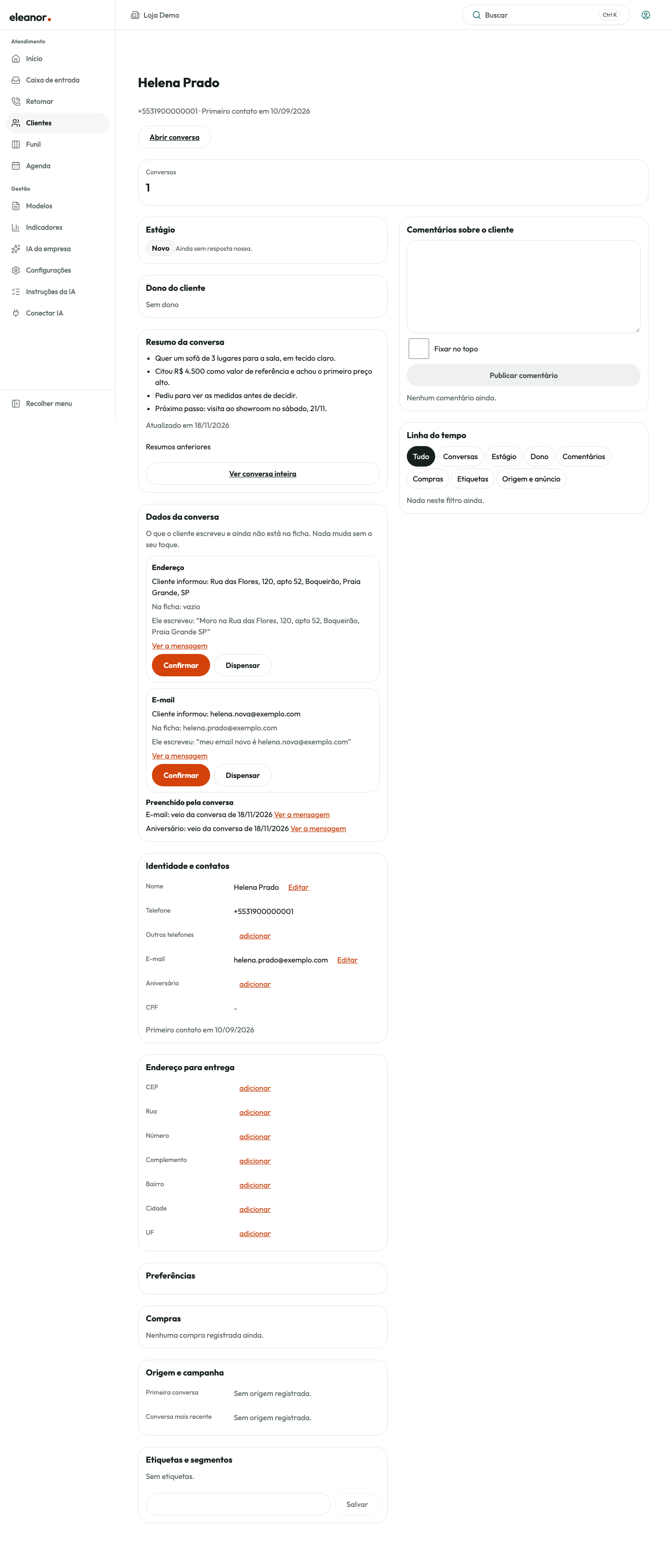
What changes in a WhatsApp CRM is the center of gravity: instead of email or the phone, the center is the conversation. The customer wrote on WhatsApp, and that's where their profile is born: who they are, what they already asked, what they already bought, which stage they're in. The chat stops being a thread of messages on a phone and becomes the living document of the relationship.
In practice, a WhatsApp CRM is a platform connected to the business's number through Meta's official API, the same channel the WhatsApp Business Platform page describes for companies. It's this official connection that lets the system see the business number's conversations, distribute them across the team, and organize what each chat carries, inside Meta's rules, with the number protected.
What it solves day to day
Four things that, without a CRM, live scattered across phones, notebooks and memory:
- The customer profile. Name, number, origin, preferences and the team's notes, right next to the chat. Whoever answers knows who they're talking to before replying.
- Centralized history. Last week's question and yesterday's answer show up on today's screen, for anyone on the team. The customer doesn't have to repeat the story and the business doesn't depend on anyone's phone to remember it.
- The funnel. New chat, in negotiation, quote sent, closed, lost: the whole team knows which stage every customer is in and what's missing to move forward. Sales stop dying of forgetfulness.
- Labels and the owner. Every conversation has an owner and a label (new customer, scheduling, after-sales). Nobody assumes "someone else will reply" because the conversation has an assigned owner.
How it works in practice
The flow of a conversation in a WhatsApp CRM is simple to describe:
- The customer sends a message to the business's number. The chat lands in the platform's single inbox, not on one person's phone.
- The chat gets distributed: to the department's owner, or to whoever is free. Nobody asks "is anyone serving this?".
- The profile opens alongside: the customer's history and funnel stage appear next to the new message.
- The reply goes out using one of the house's canned answers, written by the team, or typed right there.
- The conversation moves in the funnel: label updated, new stage, and the next messages already arrive in the right context.
All of this follows Meta's rules for the channel: the WhatsApp Business Platform page gathers what the official API opens up (messages with approved templates, catalog, webhooks and analytics) plus the quality, opt-in and 24-hour service window rules. A serious CRM works inside these rules; a system outside them puts the business's number at risk.
When a business needs one
Not every business needs one today, but these signals say when the CRM conversation stopped being optional:
- Support is one phone. The business's number lives on a personal device; when it leaves, service stops with it.
- Nobody knows the state of the deals. "Did that customer close?" has no answer without checking three phones.
- The team grew. Two people serving from the same device is the physical limit of improvising; from the third on, crossed chats are a matter of time.
- The history gets lost. When someone changes phones, deletes a chat or leaves the company, the history of that customer relationship can disappear too.
The urgency shows in one number: Zendesk treats first reply time as a core support indicator, measured per channel. On WhatsApp, the standard is to reply in minutes. A team organized in a CRM answers faster not because they type more, but because the right chat lands in front of the right person.
The minimal checklist for a WhatsApp CRM
When comparing options, demanding these seven items settles most of the decision:
- One inbox for all the business number's conversations, with an owner per chat.
- Customer profile with full history, visible during the conversation.
- A funnel with stages the team understands, showing what's missing to move forward.
- Labels to separate new customers, scheduling, after-sales and whatever the house needs.
- Canned answers for what repeats, written and editable by the owner.
- Connection through Meta's official API. Make it a requirement when you buy.
- Per-person permissions and the basic numbers: unanswered chats and first reply time.
If a candidate fails item 6, the other six don't matter. If it passes all of them, a one-week test with real conversations settles it.
Next steps
A WhatsApp CRM is the conversation turning into organization: profile, funnel, history and labels on top of the channel customers already use. The signal that the time has come is simple: when keeping the chats organized by head stops working.
Build a plan the size of your business: WhatsApp numbers, people on service and contacts, with or without AI.
Answers on this topic
Frequently asked questions
What is a WhatsApp CRM?
It's a platform connected to the business's number through Meta's official API that organizes customer relationships on top of the chats: one inbox, a customer profile with history, a funnel with stages and labels. The chat stops living on a phone and becomes the record of the relationship, visible to the whole team.
What's the difference between WhatsApp Business and a WhatsApp CRM?
The WhatsApp Business app serves one number and one person well: quick replies, simple labels, a business profile. A WhatsApp CRM comes in when service needs more people, more organization, and a history that doesn't depend on a device: shared inbox, funnel, customer profile and connection through the official API, inside Meta's rules.
Do I need a WhatsApp CRM if I answer alone?
It depends on volume and risk. One person and a few chats a day work fine in the app. A CRM starts to pay off when history becomes important (repeat customers), when the personal phone becomes a single point of failure, or when a second person joins the service. At that moment, organization stops being a luxury and becomes the condition for answering fast.
More articles
Customer stopped replying on WhatsApp? How to follow up
An unanswered quote is not necessarily a lost customer. Use research, context and permission to follow up without pressure, with Eleanor helping draft the message.
Read article

After-hours WhatsApp support: who replies at 10 p.m.?
A customer messages after closing time. How do you acknowledge their request, preserve the next step and use AI responsibly without promising a 24/7 human team?
Read article
AI Speeds Up the Customer Service You Have, Mess and All
AI in customer service doesn't fix what's broken; it multiplies what's already there. In an organized operation that's speed; in a messy one, the AI just gives the wrong answers faster. The minimum-organization checklist before automating.
Read article